Popular Forum
- Replies:
- 6
- Words:
- 3296
- Replies:
- 0
- Words:
- 1546
- Replies:
- 16
- Words:
- 6445
- Replies:
- 5
- Words:
- 201
- Replies:
- 3
- Words:
- 3596
JUANFI FLASHING ESP32
Follow these instructions to flash the ESP32 hardware using esptool.exe. This process will load the necessary firmware onto the ESP32 module.
Download the required flashing files based on your setup:
- ESP32 Wireless Base folder - For wireless setup.
- ESP32 Lan Base folder - For LAN-based setup.
- Double-click
start_flash.bat. - Connect your ESP32 to your PC using a USB cable.
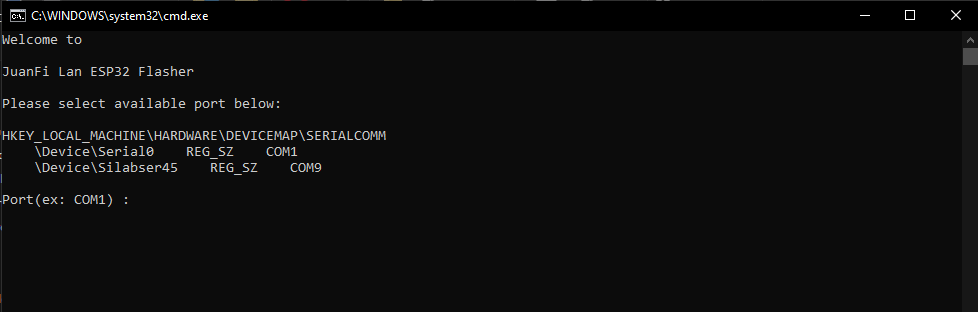
- A command prompt will appear, prompting you to select an available COM port for your ESP32.
- Choose the appropriate COM port for your ESP32 (e.g., COM9).
- Press "Enter."
- A connecting message will appear, indicating the tool is attempting to connect to the ESP32.
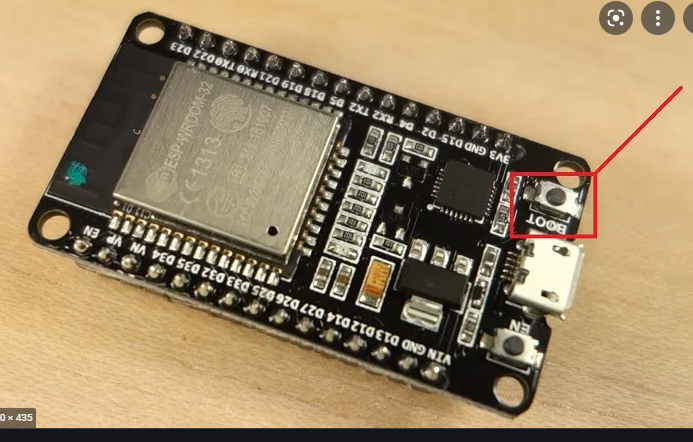
- Press and hold the flash button on the ESP32 for 3-5 seconds.
- The flashing process will start.
Wait for the flashing process to complete.
After the flashing process is finished, you can disconnect the ESP32 from your PC. The device is now ready for the JuanFi Setup.
Congratulations! You've successfully flashed your ESP32 hardware and are ready to proceed with the JuanFi Setup.
Subscribe to:
Post Comments (Atom)
--Forum Rules --BBcodes
image quote pre code